A vlog camera app that films you and the view at the same time
Most vlogging on a phone is a long sequence of camera flips. DualCapture keeps both iPhone cameras running, so your commentary and the thing you are talking about end up in the same shot.
Get DualCapture on the App Store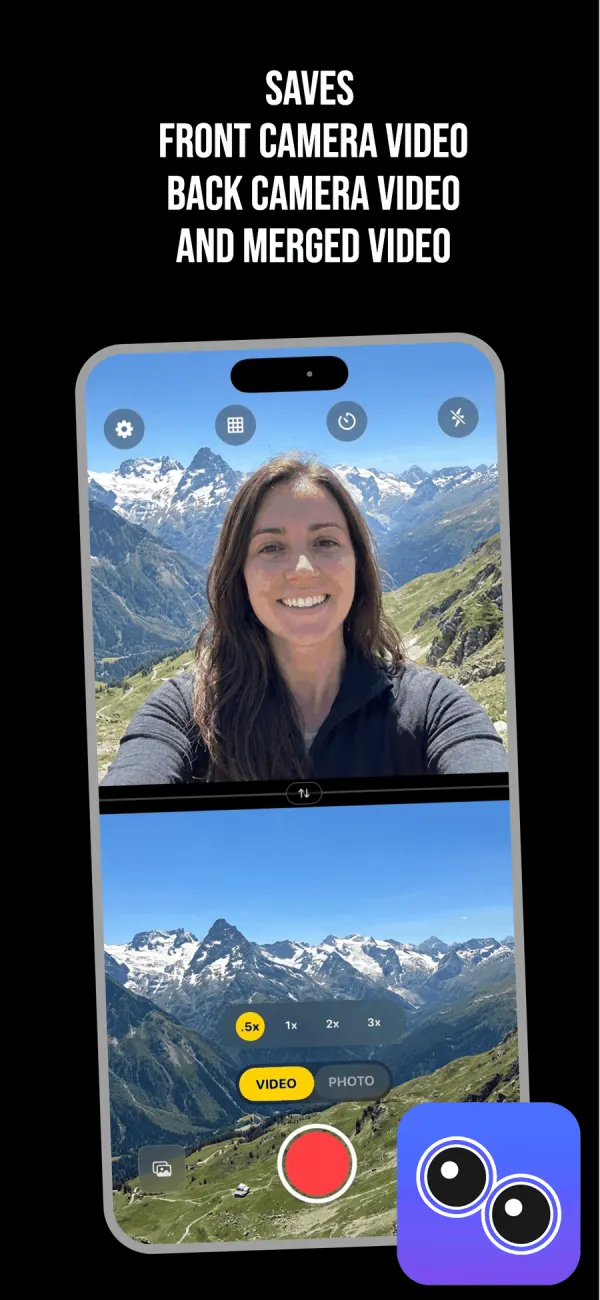
Flipping the camera costs you the moment
Every phone vlogger has done this. You talk to the front camera, you flip to the back to show what you mean, and by the time the preview settles the dog has stopped doing the thing. Then you flip back and say "well, you missed it".
A dual camera app removes the flip. Both lenses record together, so the audio never breaks and there is no black frame dropped into the middle of a sentence. Nothing has to be described after the fact, because it is on screen while you talk.
It also fixes the quieter problem: continuity. Your face and the scene were captured by the same phone in the same light at the same second, so the two halves of the frame look like they belong together. Cut a selfie clip against a separately shot B-roll clip and you can usually tell.
Layouts that suit a vlog
Three layouts. Split screen puts the cameras side by side or stacks them, and you drag the divider before you record, so a talking-head video can give your face the top two thirds. Picture-in-picture floats you over a full-frame back camera, in a window you drag into place.
For travel and food, PiP in a bottom corner is the obvious pick. The scene stays whole and your face is small but present. For a walk-and-talk where you are the subject, invert it: stack the split and give yourself the bigger half.
The swap button trades the two feeds before you start. Once you press record, the layout, the divider and the swap stay fixed, so if the interesting side changes, stop and start a new take.
Settings worth changing before a trip
Frame rate sits at 24, 30 or 60 fps, though your iPhone model can hold it lower with both cameras running. Go to 60 if you plan to slow anything down, otherwise 30 keeps files smaller and your battery alive longer.
Stabilization is a toggle in Settings and it applies to the back lens. Leave it on for walking shots. It crops in slightly, which is the trade you make for not seeing every footstep.
There is a grid for horizons and a self-timer for setting the phone down before you walk into frame. Back camera zoom runs from .5x to 3x and changes while recording. The widest setting is what makes a cramped hotel room or a narrow street look like somewhere worth going.
Editing is easier with the originals
Every recording saves three files straight to Photos: the combined video, plus the raw front clip and the raw back clip on their own.
That last part is what saves a vlog edit. Your best line was delivered while the back camera pointed at the ground? Use the front clip alone and drop your own footage underneath. Want a vertical cut for Reels and a wide cut for YouTube from the same take? Turn on Dual Orientation, a Premium setting, and each camera comes out in both shapes. Premium also drops the watermark and the length limit; free exports carry a watermark and free takes stop at 3 minutes.
What you need
DualCapture runs on iOS 18 or later, on an iPhone with multi-camera support, which the App Store listing puts at iPhone XS, XS Max, XR and newer (we build and test for iPhone 15 and newer). It is free to download. Premium covers 4K, every layout, no watermark and no time limit, as a weekly, monthly or yearly subscription, or one lifetime purchase.
If you own an iPhone 17, iPhone 17 Pro, iPhone 17 Pro Max, iPhone Air, iPhone 18 Pro, iPhone 18 Pro Max or iPhone Duo, Apple built a Dual Capture mode into the stock Camera app. It is free, it works well, and for a quick clip it is fewer taps than opening anything else. What it gives you is one picture-in-picture layout and one merged file, with no separate front or back clips. Those limits are why a dedicated app still earns a slot on a vlogger's phone.
Frequently asked questions
Can an iPhone record the front and back cameras at once?
Yes, on hardware that supports multi-camera capture, which for DualCapture means iOS 18 or later on an iPhone XS, XS Max, XR or newer (tested on iPhone 15 and newer). Both lenses run in one session and the result is written as one video, plus the individual clips.
Is this good for travel vlogging specifically?
It suits it well. The view stays on screen while you talk over it, which is the shot that otherwise costs you two takes and an edit.
Can I change the layout while recording?
No. Pick the layout, drag the divider and set which camera is on which side before you hit record. All of it stays fixed until you stop.
What resolution does it record?
Settings go up to 4K and 60 fps, with 24 and 30 fps also available. 4K needs Premium, and your iPhone model can hold resolution or frame rate lower with two cameras running.
Does it record audio from both cameras?
Audio is recorded in stereo from the phone's microphones, not separately per lens, and the same track runs under every file the take produces.
Will my vlogs have a watermark?
On the free version, yes, and takes stop at 3 minutes. Premium removes the watermark and the time limit.
Sources
Try it on your iPhone
Get DualCapture on the App Store