Picture-in-picture camera for iPhone
A PiP camera records the back camera full frame and floats the selfie camera in a corner on top. DualCapture does that live on iPhone and writes the result as one video.
Get DualCapture on the App Store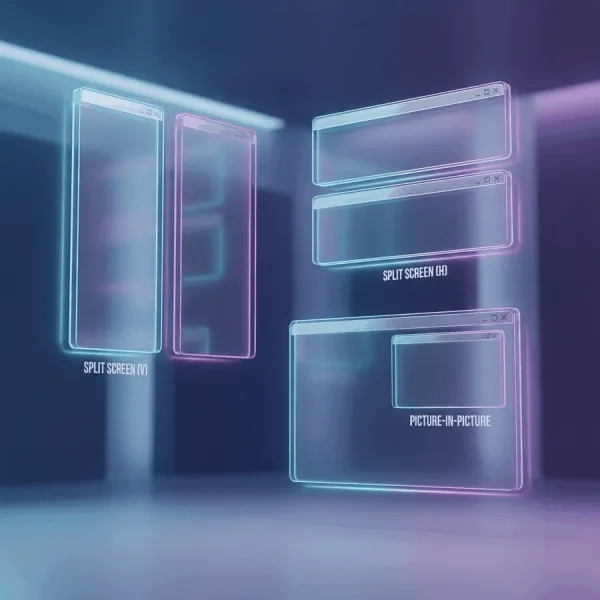
What a picture-in-picture camera actually does
Picture-in-picture is the layout you have seen on every gaming stream and half the tutorials on YouTube: the main footage fills the frame, and a small window in one corner shows the person talking.
Doing it in an editor means two clips, two timelines and a mask. Doing it in a PiP camera app means neither. Both iPhone lenses record at the same time, the overlay is composited while you shoot, and what lands in Photos is already the finished shape.
The overlay is not a filter drawn on afterwards. It is a second live camera, so your expression is genuinely simultaneous with what the back camera saw.
Four corners, and a full-screen alternative
Drag the selfie window to the top left, top right, bottom left or bottom right and it snaps into the corner, or leave it anywhere in between. Pick the spot that keeps your face off whatever matters in the main shot. The window is a fixed size, big enough to read an expression and small enough to stay out of the way.
If the corner window is too small for what you are filming, the same app has split screen. The cameras go side by side or stacked, and the divider between them is draggable, so a subject that needs more room can have it. Pick between the two before you start, because the layout is locked once the recording is running.
Before you start, you can also choose which camera is which. Tap the swap button and the feeds trade places, so the selfie takes the full frame and the scene drops into the inset. Once you press record, the layout, the swap and the window position stay fixed for the whole take.
Photos too, not only video
The mode switch under the preview flips between video and photo. In photo mode a single tap captures both cameras, and you get the selfie and the view as separate images.
It is the easiest way to prove you were somewhere. One press, two photos, no handing your phone to a stranger.
What you get back from one take
Tapping stop writes three files to your Photos library: the front camera alone, the back camera alone and the combined PiP video. Premium's Dual Orientation setting, off by default, saves each camera as both a vertical and a horizontal video instead. Nothing to export.
Keeping the individual clips matters more than it sounds. The merged PiP video is a rendered composite, so you cannot move the overlay later. The raw clips let you redo the layout in an editor whenever the corner you picked turns out to be the wrong one. Free exports carry a DualCapture.com watermark and free takes stop at 3 minutes. Premium removes both.
Settings go up to 4K and 60 fps, with 24 and 30 fps if you want smaller files. Your iPhone model can hold resolution or frame rate lower while two cameras run, and 4K needs Premium. Stabilization is a toggle in Settings and applies to the back lens.
Requirements, and what iOS already gives you
DualCapture needs iOS 18 or later and an iPhone with multi-camera support, which the App Store listing puts at iPhone XS, XS Max, XR and newer (we build and test for iPhone 15 and newer). Free to download. Premium adds 4K, every layout, no watermark and no time limit, as a subscription or a one-time lifetime purchase.
iOS 26 brought a Dual Capture mode to Apple's Camera app, and it is picture-in-picture by design: big rear frame, small front overlay you drag around the screen while recording. On the Pro models you can change rear lenses mid-take. If you have an iPhone 17, iPhone 17 Pro, iPhone 17 Pro Max, iPhone Air, iPhone 18 Pro, iPhone 18 Pro Max or iPhone Duo, try that first, because it costs nothing. It gives you one layout and one output file, and older iPhones do not get it.
Frequently asked questions
What is a PiP camera app?
One that records the front and back cameras at the same time and puts the front camera in a small window over the back camera's full-frame footage, live, while you shoot.
Can I move the picture-in-picture window?
Yes, before you record. Drag it anywhere in the frame; let go near a corner and it snaps there. The window size is fixed. If you need the front camera larger, split screen with a draggable divider is the better layout.
Does the overlay show up in the saved video?
Yes. The merged files are composited with the overlay in place. The separate front and back clips are also saved, so you can rebuild the layout differently later.
Can I take picture-in-picture photos?
Photo mode captures both cameras with one tap and saves them as separate images.
Is picture-in-picture available for free?
The app is free to download and record with, in split screen. Picture-in-picture is one of the Premium layouts, along with 4K, no watermark and no time limit.
Which iPhones can do this?
Any iPhone with multi-camera capture support, running iOS 18 or later. The App Store listing allows iPhone XS and newer; we build and test for iPhone 15 and newer.
Sources
Try it on your iPhone
Get DualCapture on the App Store