MixCam vs DualCapture: which dual camera app should you install?
Both apps record your iPhone's front and back cameras in one take. They split on what you get when you stop recording, and on what it costs to keep it.
Get DualCapture on the App Store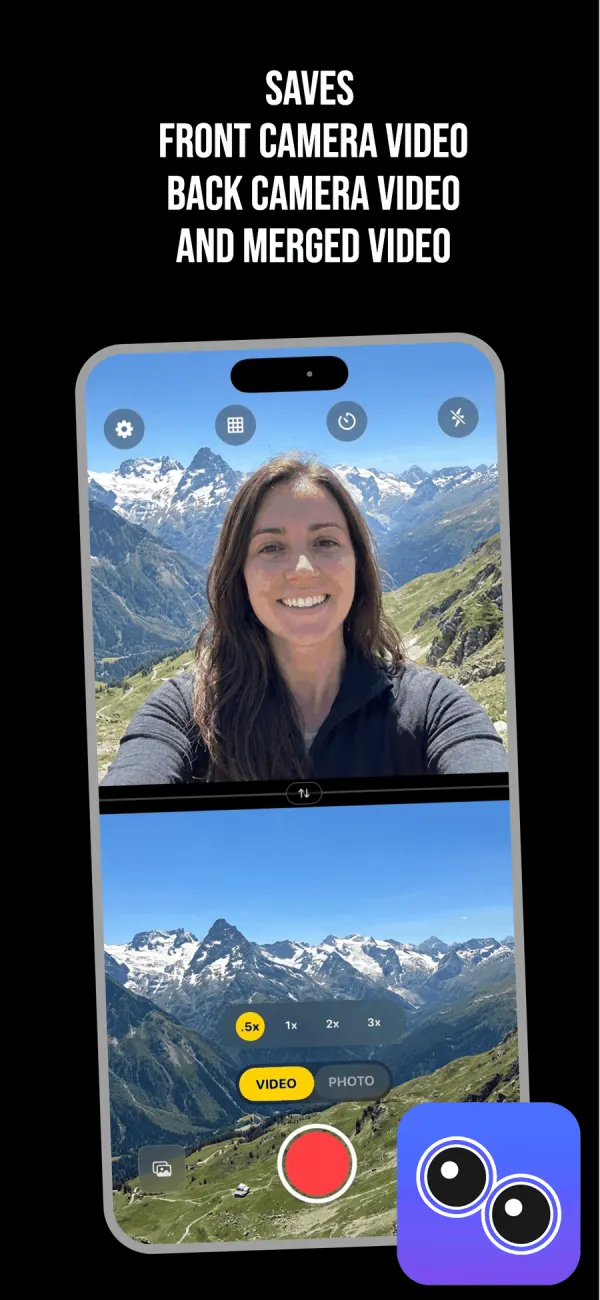
MixCam has been around longer
MixCam is made by Mixcord, and its App Store rating count is far ahead of anything newer in this category. If you want the app other people have already stress-tested, that is a real argument.
It also runs on older hardware. The listing says it requires iOS 15 or later and a device with the A12 Bionic chip or later, which covers an iPhone XS from 2018. DualCapture requires iOS 18; the listing allows iPhone XS and newer, and we build and test for iPhone 15 and newer. If your phone cannot run iOS 18, MixCam is your answer and you can stop reading here.
MixCam has modes DualCapture does not. MixOver moves the front camera feed to somewhere your thumb can actually reach while you hold the phone one-handed. A group photo mode keeps whoever is holding the phone from being cropped out. You can also switch which camera fills the screen while you are still rolling.
Then there is the purchase list. Weekly at $1.99, Business Monthly at $9.99, Pro Camera at $49.99, and a standalone $2.99 item called Remove Watermark. That last one answers a question you were probably going to ask.
DualCapture hands you three files per take
Stop a DualCapture recording and three files land in your library. The front camera on its own. The back camera on its own. The merged version. Turn on Dual Orientation, a Premium setting that is off by default, and each camera is saved as both a vertical and a horizontal video instead.
If you post straight from your phone and never edit, two of those are clutter. If you do edit, they are the difference between a short job and a re-shoot. You can cut to the face, then back to the scene, without trying to pull apart a composite that was baked in at record time.
Settings go up to 4K and 60 fps, and your iPhone model can hold either lower with two cameras running. 4K needs Premium. MixCam's App Store page does not publish a maximum resolution or frame rate, so the table below says "not listed" rather than guessing on its behalf.
Free exports carry a DualCapture.com watermark and free takes stop at 3 minutes. Premium removes both.
Side by side
| Feature | DualCapture | MixCam |
|---|---|---|
| Layouts | Split screen side by side or top and bottom, with a divider you drag, plus picture-in-picture in any of four corners | Picture-in-picture, split screen, full-screen switching, MixOver |
| Maximum resolution | Settings up to 4K and 60 fps. 4K needs Premium, and your iPhone model can limit both | Not listed |
| Separate front and back files | Yes: front, back and combined | Not listed |
| Watermark on free exports | Yes; Premium removes it | Sells a Remove Watermark purchase for $2.99 |
| Price | Free, then $0.99 weekly, $2.99 monthly, $19.99 yearly or $39.99 lifetime | Free, then $1.99 weekly up to a $49.99 Pro Camera purchase |
| Minimum iPhone | iOS 18 or later (listing: iPhone XS and newer; tested on iPhone 15 and newer) | iOS 15 and an A12 chip, so iPhone XS or newer |
| Dual-camera photos | Yes, each camera written as its own photo file | Yes, including a group photo mode |
Every cell above comes from the two App Store listings as they read today. Where a listing says nothing, the cell says "not listed".
Pick MixCam if your phone is older
The device requirement decides this for a lot of people. DualCapture needs iOS 18, so an iPhone that cannot run iOS 18 is out, even though that hardware can record both cameras at once. MixCam goes back to iOS 15 and the iPhone XS. Check which iPhone you actually have before you read another comparison.
MixOver and the group photo mode have no equivalent in DualCapture either. And if you only ever want one finished video, MixCam's single-output flow means less to sort through afterwards. Extra files are only worth having if you open an editor.
Pick DualCapture if you edit what you shoot
A merged composite is a decision made at record time, and you cannot take it back. Separate camera files leave that decision until you are at a timeline with the footage in front of you. That is the whole argument for a dual camera app that writes more than one file.
The other reasons are duller. The listing names 4K and a 60 fps setting rather than leaving them blank. One Premium plan removes the watermark and the 3-minute cap on takes, and adds 4K and every layout. If the watermark is all that bothers you, MixCam's $2.99 purchase is cheaper.
Frequently asked questions
Is MixCam free?
It is free to download. The App Store listing shows a weekly subscription, a Business Monthly tier, a Pro Camera purchase and a separate item for removing the watermark, so the free tier is limited.
Does MixCam put a watermark on my videos?
Its App Store page sells a $2.99 in-app purchase called Remove Watermark, which means the free tier adds one. DualCapture's free exports carry a watermark too, and Premium removes it.
Which iPhones can record the front and back camera at once?
Apple's simultaneous multi-camera capture needs an iPhone XS, XR or newer, which is why MixCam reaches back that far. DualCapture sets a higher software bar: it requires iOS 18, and we build and test for iPhone 15 and newer.
Can I get the front and back video as separate files?
In DualCapture, yes. Every recording writes the front camera, the back camera and the merged composite as their own files. MixCam does not list this on its App Store page.
Does either app record in 4K?
DualCapture lists 4K on Premium and a 60 fps setting. Your iPhone model can hold either lower with two cameras running. MixCam does not publish a maximum resolution, so ask its developer if that is the deciding factor for you.
Can I keep both installed?
Yes. They are separate apps with separate camera sessions. Only one can hold the cameras at a time, so close one before you open the other.
Try it on your iPhone
Get DualCapture on the App Store