Hogy rögzítse elülső és hátsó kamerát egyidejűleg iPhone-on
Két way do. One built Camera app-ba newest iPhone-okon. Other iOS 18-on run és iPhone multi-camera support-vel és separate video file-k each camera-hoz give.
Képe DualCapture az App Store-on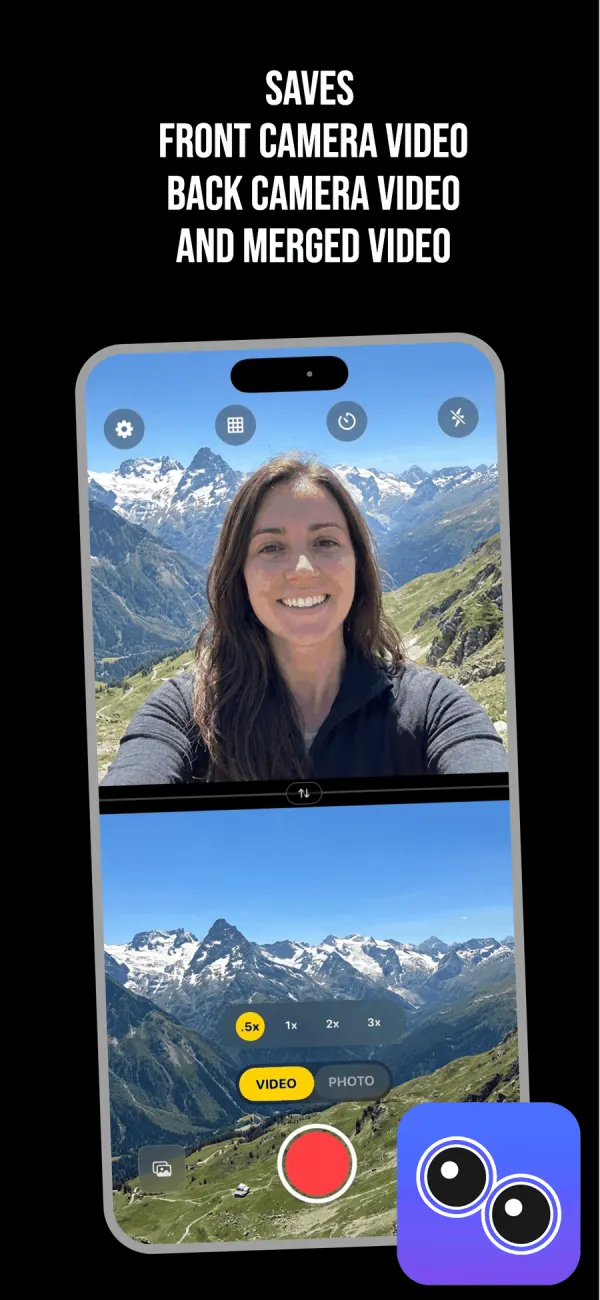
First, check mit iPhone actually do
Apple Dual Capture mode stock Camera app-ba iOS 26-ban added. iPhone 17, iPhone 17 Pro, iPhone 17 Pro Max, iPhone Air, iPhone 18 Pro, iPhone 18 Pro Max és iPhone Duo-on run. No older model get.
Limit software decision, nem hardware one. Apple multi-camera capture API iPhone XS és XR-on iOS 13 2019-ból run, miért third-party app-ok been doing this six years. So if own iPhone 16 és cannot find Dual Capture Camera app-ban, not missed setting. Never shipped phone. More gap-ban mit Apple dual camera mode can és cannot do.
DualCapture iOS 18 vagy later kell. App Store listing iPhone XS, XS Max, XR és newer kell, és build és test iPhone 15 és newer-hoz.
Method 1: built-in Camera app iPhone 17-on
- Open Camera és swipe across Video-ra.
- Tap control icon top right corner-ban extra shooting option-ok open.
- Choose Dual Capture menu-ból.
- Drag small front camera window whichever part frame want.
- Tap shutter start recording.
Three thing-ek know mielőtt rely. One layout és cannot change: rear camera fill frame és face sit small floating window-ban. No swap, no split screen. 1080p vagy 4K 24 vagy 30 fps-on record. Everything comes single merged file-ként, szóval cannot pull két camera later editor-ban.
Hol drag little window also baked recording-ba. Move mid-take és move final video-ban good.
Method 2: DualCapture iOS 18-on
- Install DualCapture és grant camera és microphone access first time launch.
- Tap VIDEO mode toggle above record button.
- Open settings gear icon top left-ban és pick layout.
- Drag divider up vagy down give one camera more frame than other.
- Tap swap button if want back camera top instead.
- Pick zoom level back camera-on: .5x, 1x, 2x vagy 3x.
- Tap red button record.
- Tap thumbnail bottom left-ban watch back.
Do all mielőtt tap record. Once take running, layout, divider és swap stay fixed until stop.
Pick layout mielőtt press record
Split screen vertical stack két camera one above other, ami suits phone held upright Reels vagy TikTok-hoz. Split screen horizontal put side by side wide frame-hoz. Picture-in-picture float selfie over main video, és drag any corner-ba.
Divider draggable split screen-ban, szóval talking-head vlog give face third frame és rest mit filming. Nem decision editor-ban.
Mit end up photo library-ban
One take produce three file-k: front camera own, back camera own és merged composite. Premium Dual Orientation setting, off by default, save each camera vertical és horizontal video-ként instead, Stories és full-screen playback-hoz.
Separate file-k matter more than sound. If face distraction ten secund middle, cut back camera clip-ra és drop merged one. None possible single flattened file stock Camera app-ból.
Settings up to 4K és 60 fps stabilization-on, és iPhone set how high can go két camera running-vel. Pro no time limit és no watermark; free version stop take 3 minute-on és add DualCapture.com watermark.
Getting take worth keeping
Wipe front lens. Live against leg pocket-ban all day és show camera-on way rear glass nem.
Set focus és exposure mielőtt start rather during, because mid-take exposure jump obvious playback-on. Watch battery long take-on, since két camera pipeline pull hard és phone get warm.
Anything past couple minute, prop phone up. Handheld dual camera footage shake twice visibly, because viewer két moving frame compare.
Frekventen kért kérdések
Record both camera once iPhone 14 vagy older-on?
Possibly. App Store listing iPhone XS, XS Max, XR és newer iOS 18 vagy later-on kell, de build és test iPhone 15 és newer-hoz. App-ok, amik iOS 14 vagy 15 target, reach back as far as iPhone XS.
Miért Dual Capture missing Camera app-ból?
Apple limited iPhone 17, iPhone 17 Pro, iPhone 17 Pro Max, iPhone Air, iPhone 18 Pro, iPhone 18 Pro Max és iPhone Duo-ra. Any other model-on nem appear menu-ban, és no setting turn on.
Built-in mode save két camera separate video-ként?
Nem. One merged file write both camera flattened together, szóval cannot separate later. DualCapture write front camera és back camera own file-ként alongside merged one.
Record both camera 4K-ban 60fps-on?
DualCapture settings up to 4K és 60 fps offer, és each iPhone-on use highest setting hardware kell két camera running-vel, ami lower can be. Built-in Dual Capture mode top out 4K 30-on, 24 és 30 fps only option-ok-vel.
Switch which camera big one while recording?
Nem during take. DualCapture-ban choose swap button-vel mielőtt record, és stay fixed until stop. Apple built-in mode keep rear camera large whole recording.
Források
Próbálj a tvá iPhone-on
Képe DualCapture az App Store-on